Navigate to the MyEPB portal login page at epb.com/paybill. Choose “Pay as a Guest”.

'
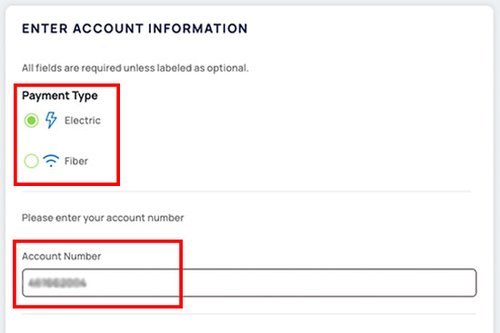
Select whether you are paying your Energy or Fiber Optics bill and enter your account number.

'
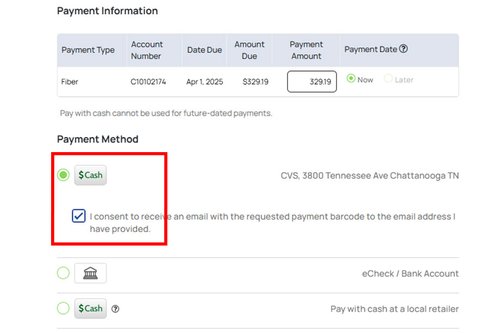
Complete the required fields with your information, enter the amount you wish to pay and choose “Cash” as your payment method. Be sure to check the box below to receive your payment barcode.
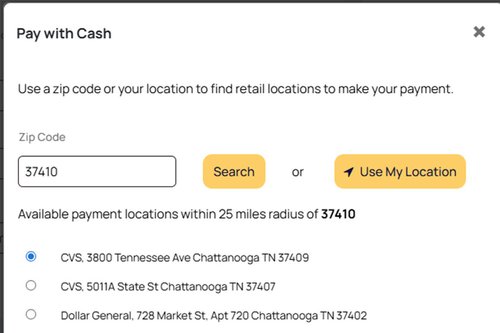
Choose your preferred retail location from a list of options based on your zip code. You can also select the “Use my Location” feature which is perfect if you’re traveling and unsure of the specific zip code.

'
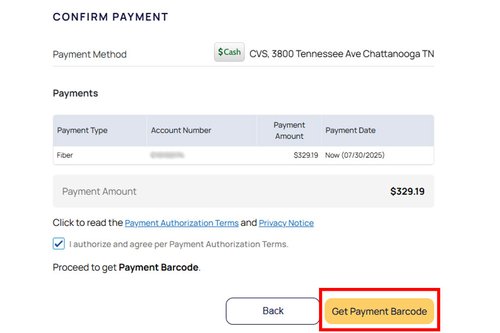
Review your selected location and payment amount. Confirm by selecting “Get Payment Barcode”.
'

'
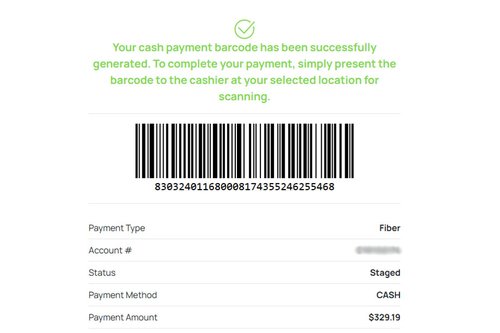
Your barcode will appear on the next screen and will also be sent to the email you provided. Each barcode is tied to your specific account and chosen retailer, and is valid for 24 hours. If you want to use a different retailer—or if the 24-hour window expires—you can easily generate a new barcode by repeating the previous steps.'

'
While in-store, you can use regular checkout lanes to make your bill payments. Present your unique barcode to the cashier to scan.
After your barcode is scanned, tell the cashier the amount you would like to pay. The total amount due will be shown with the barcode screen. Please note that “Cash” bill payments can only be completed using cash.
Navigate to the MyEPB portal login page at epb.com/paybill. Choose “Pay as a Guest”.
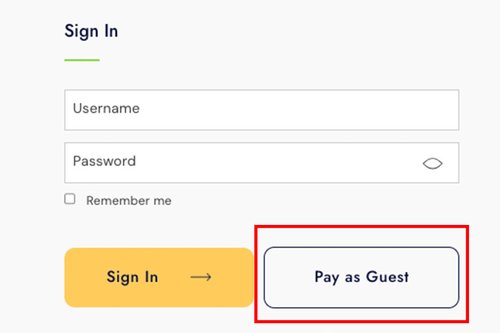
Select whether you are paying your Energy or Fiber Optics bill and enter your account number.
Complete the required fields with your information, enter the amount you wish to pay and choose “Cash” as your payment method. Be sure to check the box below to receive your payment barcode.
Choose your preferred retail location from a list of options based on your zip code. You can also select the “Use my Location” feature which is perfect if you’re traveling and unsure of the specific zip code.
Review your selected location and payment amount. Confirm by selecting “Get Payment Barcode”.
Your barcode will appear on the next screen and will also be sent to the email you provided. Each barcode is tied to your specific account and chosen retailer, and is valid for 24 hours. If you want to use a different retailer—or if the 24-hour window expires—you can easily generate a new barcode by repeating the previous steps.
While in-store, you can use regular checkout lanes to make your bill payments. Present your unique barcode to the cashier to scan.
After your barcode is scanned, tell the cashier the amount you would like to pay. The total amount due will be shown with the barcode screen. Please note that “Cash” bill payments can only be completed using cash.
We are currently unable to process your request. Please refresh or try again later.
If you continue to experience this issue please contact us at (423)648-1EPB.
We are currently unable to process your request. Please refresh or try again later.
If you continue to experience this issue please contact us at (423)648-1EPB.